')

Quick and Easy Network File Search

Hunt down any file in the network


Version reviewed: LAN Search Pro 8.3

Lan Search Pro allows you to search for specific file names or for specific file types such as MP3 files. It provides a lightning fast search engine and lets you search hidden network resources, restricted access resources, IP subnets, LAN FTP servers and much more.

Features:

Search according to the specified criteria, search filters.
Ability to search the hidden resources, IP subnetworks, LAN FTP servers.
Ability to search the resources with restricted access (the ones you need a login and password to access).
Ability to ignore some computers (e.g. slow servers) when performing the search. You can also search for specific servers only.
Ability to search specific network folders and much more.
Save, load, sort, navigate, and perform any other actions on the search results.
Fast multithreaded search engine.
Support of large amounts of data – the list can now contain up to 2,000,000 files!

LAN Search Pro looking for query results
Enlarge picture
Regardless of how organized your files are on the computer, a search tool will always help you find a document faster. There are plenty of third-party tools to achieve this and even Windows integrated an indexing option in Vista for faster finds. But if we're talking about searching in a network, things get a tad complicated. Not too much, as Vista always provides the means to look for files in a network, but it is slightly more difficult.

LAN Search Pro is a portable instrument designed, as its name suggests, to give you a hand in searching for files in a computer network. Despite the “Pro” appendage to the name the software is a freebie and on top of this it needs no installation and can be run from removable drives.

When launching the software a simple interface ready to get down to action welcomes you. The largest part is reserved to search results while the upper part is dedicated to the button bar, which features functions for clearing the results, saving them to a DAT file, loading them, exporting to CSV, XML or HTML, finding the desired item in the result list, mapping and unmapping drives, scoping (choosing only a part of the network), direct access to the Options panel and password management for the areas with restricted access. All of them can be found in the menu bar and most of them benefit from hotkeys.

No special skills are required to work with LAN Search Pro and you can simply go on and type in the search query and then wait for the results to be displayed (which, by the way, will take a little longer than expected because the application has to parse all the files as it does not come with a file indexing service). But if accuracy is what you want, then additional settings have to be made. You can start with selecting the search scope and choosing the networks you want to be scoured for the files you're looking for.

When returning the results you are not given any estimation for the job completion, but instead the application provides the current status of the task and the number of active threads. Sure this is no estimation and waiting to finish or stopping the process are the only alternatives available. Once the search is complete an information window pops up notifying you of the number of files found.

As mentioned before, LAN Search Pro features a built-in look-up tool you can use to pinpoint the desired item in the result list. If hotkeys are more to your liking, Ctrl+F calls the specific function in no time. All results benefit from complete location path, size as well as date and time of creation.

For more specific results the program sports quite a bag of options consisting in filters (size and date), network locations, enabling search in hidden folders or FTP location. Moreover, you can enable a set of directories that can be excluded from the search or restrict the file hunt down only to specific folders. All these options are to be negotiated with in the Options panel.

A very useful feature in LAN Search Pro is the ability to look inside text files. In the configuration screen, under the Main tab you will find in the lower part the miscellaneous section, which lets you enable text searching. With this option active in the main application window besides the regular file name search box there will also be another one where you can put some text in order to make the results more accurate. Combined with date and size filters text search turns into a powerful feature.

Drive mapping is not a function that will come in useful when using the program as it will actually invoke Windows' Map Network Drive and your choice will be available in Windows Explorer as well as other file manager installed on the system. Other than this there is no other use for this option.

If you have a particular set of options you want to keep and don't want to make the choices for each search, LAN Search Pro makes available an easy way for this. Profiles with the settings can be saved to any location you want and loaded whenever needed. You can save as many profiles as you want for whatever type of search you want.

To make every search as flexible as possible, the developer of the software added support for wildcards. The same rules as for MS-DOS and Windows apply in this case and several wildcards can be used as long as they are separated by semicolons.

LAN Search Pro proved to be a reliable network search tool, easy to use and efficient in its endeavors. For such a small program the list of options is impressive and in some cases even exceeded expectations.

The Good

Portability and being a freeware combined with a powerful feature set and ease of use are among the top qualities of the product. It features text searching and more accuracy is obtained via search filters, exclusion lists for both directories and network locations, hidden folder search and FTP search.

Profiles can be created in order to avoid making the same settings over and over again. From the result list you can open the files, copy, move them, open the folder they are located in as well as creating a shortcut on the desktop.

The Bad

Drive mapping is not a pillar function in the application, but it is not useless either. However, stopping the search is not among LAN Search Pro's strong points as it takes quite a while to stop the process.

The Truth

LAN Search Pro can be run from a removable drive and it is highly configurable for a search tool. It has no problem with accessing network location in search for the desired files. Stopping the search takes a while but on the other hand it goes easy on system resources.

If there are flaws in the application it does a fine job hiding them as our testing went smooth, with no hiccups.

Here are some snapshots of the application in action:

Review image Review image Review image

Review image Review image Review image


Reblog this post [with Zemanta]


Read more...

AXIGEN Mail Server Review

A professional e-mail solution for any company


Email, e-mail or eMail, however you may prefer to call it, has been around since the beginning of the Internet era and is now, understandably, even taken for granted. The protocol for sending emails, SMTP (Simple Mail Transfer Protocol), became an Internet Standard 10 since 1982. Early emails were composed using the ASCII character set and we all know what they look like today. Photos, sounds, animations, videos or virtually any file format out there can be attached to an email and safely arrive, in a matter of minutes, to its destination.

Expecting it to just work, we rarely think about the technology behind it and the constant struggle to deliver e-mails almost in real time, while keeping inboxes as clean as possible. That being said, I think we will all agree that e-mail is a great and extremely useful technology these days. And for that reason we decided to review the very backbone of your e-mail addiction: an e-mail server. We chose a product created by the well-known Romanian company Gecad Technologies – some of you may remember their popular RAV AntiVirus solution that was sold to Microsoft back in 2003. Since then, Gecad refocused on providing new, revolutionary messaging platforms under the name AXIGEN.

The AXIGEN Mail Server comes in four "flavors": Business Edition, Enterprise Edition, Service Provider Edition and the Office Edition, which is completely free. Each of the aforementioned editions is scaled according to customer needs, and the prices range from approximately 275 Euros with 25 mailboxes to 2930 Euros for the full-blown, 5000 mailboxes – ISP edition. However, if your company needs more than 10,000 mailboxes, AXIGEN can provide you with such large scale solutions too.

Installation

Being accompanied by comprehensive documentation, the AXIGEN Mail Server installation is a pretty straightforward process and can be done by almost anybody, provided they have at least some base Linux terminal knowledge, as it needs su privileges. And knowing that this product is mainly for IT professionals, the command-line installation is as easy as it can be. Leaving that aside, it is also very fast and you will be ready to configure your settings in no more, probably less, than two minutes. After the install process is finished, the services won't start automatically, as you must do the initial configuration: setting the admin password, primary domain, SMTP and POP3 interfaces etc. Fast forward, and you are ready to start your mail server, but not before shutting down other web or mail services (Apache, Sendmail, Postfix, IMAPD, Dovecot) that could interfere with AXIGEN. That being done, simply run the following two commands "sudo /etc/init.d/axigen start" and "sudo /etc/init.d/axigenfilters start" and you have a working mail server ready to be further tweaked to your needs using the simple, clean and efficient web interface.

The Web Interface

After typing in the password, you enter the WebAdmin panel and everything is exactly where you would expect it to be. The left pane displays all the categories, the middle pane shows the settings for the selected subcategory, and on the right, Contextual Help is available for quick understanding of what's going on in that page. Also, in the upper-right hand corner of the interface, a "Home" icon will appear if you leave the first page. Near it, a useful "Contact Support" link will accompany you on every screen, facilitating a quick access to assistance.

The first category is "Global settings" in which you can view your Primary Domain and the SSL Random File. Under that, another panel will display license information like the numbers of machines and mailboxes that are managed, the Tech Support provider, currently installed addons and other details regarding the limitations of the license you bought.

The Services category is where you start, stop, restart and configure all of AXIGEN's mail services (POP3, IMAP, SMTP, etc.). The very thorough configuration subcategories allow you to customize your server to the finest details. A simple Log Level slider exists in almost all settings pages and will instruct AXIGEN to either log everything or only critical events. The Flow control will allow you to limit the number of simultaneous connections and the maximum connections per x seconds, minutes, hours or days. Error control will close sessions after a number of invalid commands received from clients or failed authentication attempts. This number can range from 0 to 100. There is also support for the StartTLS technology – a quality Encryption and Authentication method and Thread Management for normal or overload situations. You can even set the Greeting message for the POP3 and IMAP services. Another "safety net" provided by AXIGEN is Email Loop Protection that will reject emails that have more than "X" received headers.


Security and Filtering

With huge amounts of spam, malware and viruses coming 24/7 from all over the world, the true power of a mail server solution might just stand in its ability to filter out these pests constantly while still allowing legit emails to get through. AXIGEN is able to work with several applications to address these issues. Support for SpamAssassin, AVG, AVAST, ClamAV, Commtouch, amavis is available, along with the more generic aximilter interface, which enables connecting to even more security or filtering products. All these solutions will attempt to clean infected emails and if that's not possible it's your choice what to do next. You can either still deliver them, move them to trash or just discard them. The same goes for emails marked as suspicious. The AntiSpam configuration features two 0-10 thresholds with 0 meaning not spam and 10 being spam. After receiving a score from SpamAssasin, the messages will either be sent to the SPAM folder or deleted, according to the readout on the threshold. For example, if you set the "move to spam" threshold at 5 and the "delete" threshold at 8, all messages that get a 5 or higher score will be moved to the spam folder and those with an 8 or higher score will automatically be deleted. Very, very helpful and so easy. Of course, you can always integrate your favorite AntiVirus solutions and create Whitelists and Blacklists for specific addresses. Other anti-spam methods include country filtering (in collaboration with MaxMind geolocation service), Sender Policy Framework, Domain Keys, DNS BlackLists and DNS Check.

Status and Monitoring

AXIGEN Mail Server offers a comprehensive reporting service and has the ability to create charts for an easy overview of the server's load and activity. You can enable SNMP (Simple Network Management Protocol) and add listeners for it, collect domain and domain object data (with the option of renewing samples at an interval ranging from 0 to 848 weeks) and set the logging level.

When creating a new chart, you are asked to name it and add it to an existing group, or create a new one. Next, set the start/end time and dates, choose the data you want to be used, play around with the colors if you don't like the default ones and that's it. It will start monitoring and you can, at any time, download the collected data summary either as a CSV or an XML file.

The storage chart will give you a quick look at how much space is being used, but you can also view a detailed version of it, which provides more in-depth information. Note that AXIGEN Mail Server will only use what it needs to use, with an auto-expanding storage size (of course, within the limits imposed by you).

In the logging subcategory you can decide whether you want to separate service logs or centralize them in a single file. You can also view saved logs (.txt extension) right from the interface.

Migration and Back-up

AXIGEN offers automatic and manual migration solutions through IMAP. All domains, accounts and mailboxes from any mail server platform can be migrated seamlessly; it will even copy the server's login credentials and create an exact replica of it. You simply cannot ask for a simpler tool.
Review image

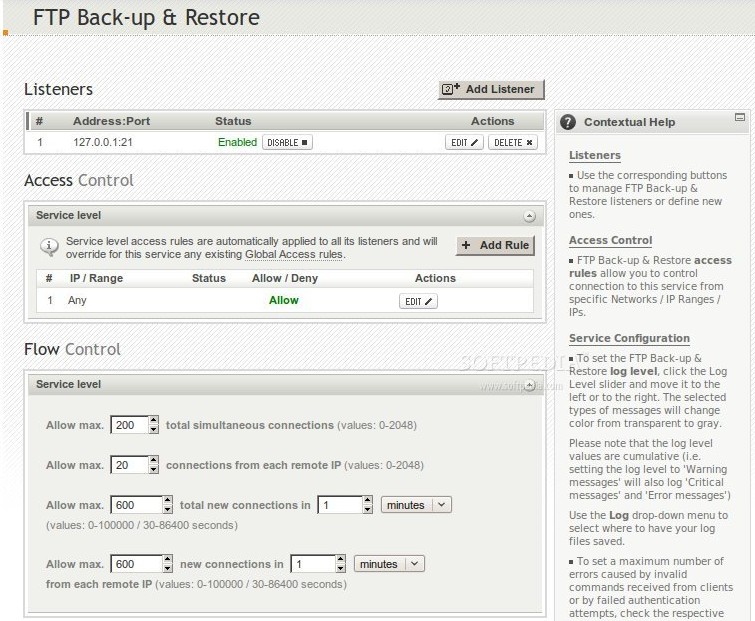
The AXIGEN team also included a complete Back-up & Restore function (with flow, error and thread controls) facilitating full or partial restores and both offline and online backups. This service can also be accessed from more than one location, giving administrators the ability to set access rules for specific IPs. Advanced clustering support with multi-tier setups, LDAP authentication and routing, SMTP routing to back-end, POP3 & IMAP WebMail proxies and integration with the RH Cluster Suite are also available.
Review image

End-users are also sure to have a great experience using AXIGEN's email services with features like:

· Localized WebMail clients
· Mobile WebMail
· Personal organizer
· Address book
· Multiple skins
· Printer friendly emails
· Out-of-office messages and much more.

The Good

Fast installation and configuration, quick understanding of all the functions under a very clean and efficient Webadmin interface and a plethora of settings that can be tweaked are some of AXIGEN Mail Server's strong points. Add those to stability, almost unbeatable security and great overall performance and you get this high-class mail server solution.

The Bad

Newer Linux distributions are not fully supported. The AXIGEN mail server refused to start automatically at bootup on Ubuntu 8.10, which was released quite a while ago. But this is definitely not a huge problem and, knowing that Gecad updates the server quite often, I'm sure this bug will be addressed in no time.

The Truth

Whether you are an admin or an end-user, working with or under AXIGEN's mail server is bound to make you a lot more efficient and a lot less worried. Yet another great product from a company worthy of its reputation.

For more information and other linux software review , visit here.

Read more...

Apple buying up the world's flash memory

Shortages and price jumps for other gadget makers

The demand for iPhones and iPods is expected to be so great this year, Apple has bought up a huge chunk of the world's flash memory supply, causing shortages and raising prices for other manufacturers.

A report from ThinkEquity about the broader NAND flash RAM market suggests Apple has snapped up all the flash Samsung can make until April.


Apple first, then the rest

As the Korean firm makes 40 per cent of the world's NAND, that represents a very healthy appetite for Apple gear.

Such huge orders are squeezing the supply to other device builders, but are also putting unexpected pressure on some components as companies scrabble for what they can get.


Next-gen iPhone?

ThinkEquity says small 1GB and 2GB chips are rising in price, as Apple seems to have cornered the market for 8GB and 16GB components. The situation is exacerbated by the fact that memory makers are in the process of phasing out the smaller units anyway.

Naturally, this being Apple we're talking about, there's already speculation about the memory being destined for version three of the iPhone. We'll leave that one for now, but expect to hear plenty more in the near future.


By J Mark Lytle


Reblog this post [with Zemanta]

Read more...

Job Hunters: Mind Your Tech Manners

Job seekers today face stiff competition. However, they also have an array of tech tools at their disposal: mobile email, social networking Web sites, advanced search capabilities, etc. These can all aid in the search for a new job, but failure to observe the proper etiquette when using them can be costly.

If there's any small solace when starting a job search in this recession, it's the proliferation of digital technology to help you re-enter the working world.

Web sites like Indeed.com and LinkedIn.com have multiplied the number of job openings you can track and the professional contacts you can make. Email and smartphones make it easier to pitch yourself and set up appointments.

But think twice before picking up that BlackBerry and thumb-typing a message to the hiring manager whose email address you so slyly uncovered online. In the end, landing the right job hinges on old-world skills.


An Electronic Foot in the Door

"The electronic piece usually just gets your foot in the door," said Dave Willmer, executive director of Robert Half Technology, a tech industry recruiting division of Menlo Park, Calif.-based staffing consultant Robert Half International.

"But you still have to present yourself well face-to-face in an interview, and you have to have good references," he said. "I think some job candidates lose sight of that because of all the technology options and capabilities that get your name out there."

Willmer and Kate Wendleton, president of The Five O'Clock Club, a New York-based career counseling company, advise that job seekers -- especially the young and tech-savvy -- frequently misuse electronic gadgets and the Web and run roughshod over professional etiquette.


Do's and Don'ts

Some of their advice:

  1. Avoid Email Blasts: Resist the temptation to respond to each online job listing in your field, and focus on those that fit the best. Only about 6 percent of jobs are filled by candidates recruited through advertisements, said Wendleton, whose firm also conducts career research. If you can use personal contacts to learn about an opening that's not widely publicized, your chances of landing the job increase because you've got fewer rivals. Instead of blast emailing, use the Web to research potential employers and put yourself in position to recite key facts about that company should you land an interview.

    "Too many people are sitting there all day hitting that send button on their computer, answering ads, answering ads," Wendleton said.

  2. Embrace snail mail: In your first contact with a prospective employer, you're unlikely to stand out if you join the legions of job seekers sending 'hire me' pitches via email with resumes attached. Emails also are too easy for a hiring manager to delete. With snail mail, you control the appearance of your carefully crafted cover letter and resume. With email, the user's machine can control settings for fonts and spacing. And managers can be wary of opening attached resumes for fear of unleashing a computer virus.

  3. Get personal: If you resort to email pitches, make them personal. If you're introducing yourself to a hiring manager you've identified via a professional colleague, type that colleague's name in the email's subject line and succinctly explain the link (e.g. "John Doe referred me") so the manager is less likely to hit delete.

  4. Avoid follow-up foibles: If you land an interview, pay close attention if the hiring manager specifies how to make any follow-up contacts. Email can be a good option because of its speed; if you send a follow-up note via snail mail, it may arrive too late in the hiring process to make a difference. If the hiring manager is OK with email, send a message that addresses any unanswered questions from the interview and state that you're also mailing a hardcopy. In the snail mail message, reference that you also sent the email.Whatever you do, don't follow up on an interview with an email sent via a handheld gadget -- there's too great a chance you'll thumb-type a typo-ridden message. Only use handhelds to send brief, timely emails confirming an appointment or advising you're running late for a meeting. Don't type without regard to grammar and capitalization, and resist including smiley faces or other emoticons in electronic messages. "There is no circumstance where that is appropriate," Wendleton said.

  5. Observe boundaries: Even if you managed to track down a hiring manager's cell phone number, don't call it unless given permission. "Cell phones are considered private," Wendleton said.

  6. Stick with land lines: For any phone contact with a prospective employer, try to use a land line. With cell phones, there's too great a risk that you'll get a spotty connection, lose it altogether, or end up with excessive background noise if you're in a public place. If you lack a land line, call from a quiet place like a hotel lobby. Have a pen and pad ready so you can jot down information.

  7. Network the smart way: If you identify a hiring manager or other professional you'd like to connect with on an online networking site, don't merely send an electronic invitation without explaining why you want to get in touch. An out-of-the-blue request will likely be ignored. "Write something like, "I was intrigued by your LinkedIn posting. I see you have 10 years of international experience. I too have 10 years of international experience,'" Wendleton said.

  8. Manage your digital footprint: Hiring managers can be expected to go beyond your resume and references, and perform a background check online. So be judicious about what you post on social networking sites such as Facebook, and limit access to friends and family if it's something you wouldn't want an employer to see. Likewise, think before posting political opinions or personal information in blogs or other online forums. Consider posting under a pseudonym rather than your name. "As a job candidate, I would encourage people to be conservative," said Willmer. "Assume that anybody has access to anything."

Reblog this post [with Zemanta]

Read more...

Nokia Bums $630M to Fund Symbian R&D

Aiming to sharpen up its line of Symbian-based smartphones, Nokia has borrowed 500 million euros from the European Investment Bank. It expects its R&D activities will help Symbian as a whole. The operating system software has been included on 250 million handsets shipped to consumers.

Nokia (NYSE: NOK) More about Nokia said Thursday it has signed up for a 500 million euro ($630 million) loan from the European Investment Bank to help finance research and development projects.

The world's largest mobile phone maker said the five-year loan, to be used in 2009-2011, was aimed at making its Symbian-based smartphones more competitive.

Being for the Benefit of Symbian

"Nokia envisages that the research and development activities supported by this loan will also benefit the work of the Symbian More about Symbian Foundation and its development of open source software for mobile devices," Nokia said.

Last week, Nokia announced that more than 75 leading technology companies had signed up to use Symbian OS, an operating system for mobile phones developed and licensed by Symbian.

More than 250 million Symbian OS-based units have been shipped to customers since the formation of Symbian 10 years ago, Symbian Software said.

Handheld Heavyweight

Finland-based Nokia is the world's No.1 cell phone maker.

Last year, it sold 468 million handsets, up 7 percent on 2007.

Reblog this post [with Zemanta]

Read more...

  © Blogger template Writer's Blog by Ourblogtemplates.com 2008

Back to TOP  

')